Showing posts with label Visual Studio Extensibility. Show all posts

Wednesday, 19 March 2008

Microsoft Software Factory Portfolio

Introduction

The Software Factories provide you with a set of proven practices for building distributed applications. These practices are exposed through architectural overviews, patterns, how-to topics, reference implementations, automated guidance packages, and application blocks. There are several SW factories you can download today ( Web Service (WSF), Smart Client(SCSF), web client (WCSF))

Microsoft Software Factory


  • Software factories mean, different things to people: some are more academic, some are more pragmatic and more tool-focused. Like the one Microsoft is using for example “A software factory is a structured collection of related software assets.
  • When a software factory is installed in a development environment, it helps architects and developers predictably and efficiently create high-quality instances of specific types of applications.”
  • Although the differences, they all share some common motivator : helping the developer (or designer/architect) to get the job done in a more efficient way (time-to-market) and more with more quality.
  • MS SF is also about guidance. It should feel having an experienced person next to you and advising you what you should , when you should do it and how you should do it . In the current incarnation of SF this will translate into some menus, wizards and templates to the standard Visual Studio environment (Solution Explorer) to help developers build whatever the SF was intended for.
  • MS SF is also about automation. Capturing this expertise/best practices/guidance into integrated, automated features of Visual Studio and letting Visual Studio do some tasks in a consistent (so less error-prone) way , takes away some chores from the developer. You could say SF are about re-use but not only code but also expertise.
  • MS SF is also geared towards abstraction . The patterns and best practices to build a web service are not directly translated into code but there’s is an intermediary step. This gives you an opportunity to delay certain implementation decisions. It enforces you to think about it first. So the model is not the code but an abstraction (visual or not) of what you’re trying to establish and this data is kept and not lost.
  • The technologies that makes this possible are
    - The Guidance Automation Toolkit and its "run-time" companion Guidance Automation Extensions (GAX/GAT)
    - Domain Specific Language toolkit
    - Advancements in Visual Studio itself (Designer Integration Service)
  • The main point is that Microsoft Software factories help Software Factories help you build a specific kind of application.


Domain Specific language and DSL Toolkit


  • A domain-specific language (DSL) is a programming language or executable specification language that offers, through appropriate notations and abstractions, expressive power focused on, and usually restricted to, a particular problem domain.
  • The DSL Toolkit (in the SDK) allows you to build visual interaction components that can be used from with in VS just like you would for example use a Winform Form designer. You drag & drop the VS-integrated graphical notations for a given model on the canvas and model the part of the application the DSL was conceived for. Later the actual code is generated for you. So the toolkits allows you to construct a custom-tailored designer for a model for a particular problem domain.
  • The main reason for this specialisation is that the more focused you are on a domain, the more specific you can make the abstractions and the better you can generate code from this models. Note that domain is not necessarily technical but also can be created for a particular sector like healthcare or finance.


Guidance Automation extensions and toolkit

  • The Guidance Automation Toolkit and its "run-time" companion Guidance Automation Extensions (GAX/GAT) enable you to extent the Visual Studio 2005/2008 experience.
  • The Guidance Automation Extensions (GAX) is the runtime part that needs to be installed on the machines of the developers that want to use the Guidance Packages.
  • The Guidance Automation Toolkit (GAT) is the authoring part that helps you create the Guidance Packages and the setup projects to install them. Once you've installed GAT, you'll notice a new project type in Visual Studio called "Guidance Packages". This will contain all the packages that were installed on this machine.
  • Designed to simplify integrating reusable code into applications.
  • Allows architects to automate development activities that developers would usually have to perform manually; often by following a series of instructions.
  • By using the toolkit, architects can also ensure that repetitive and often error-prone activities are performed in a consistent manner, streamlining and accelerating the development process.

Portfolio

Gives answer to various scenarios
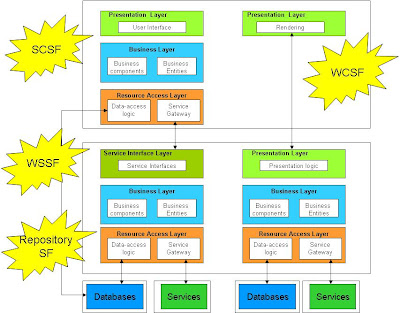


  • Smart Client Software factory
  • Web Client Software factory
  • Web service software factory
  • Mobile Client Software Factory
  • Repository factory : The Repository Factory generates business entities, stored procedures, and repository classes based on an existing database. Can be enabled in the other factories.
  • Application Block Software Factory : Included in the Enterprise Library - guides developers through the process of creating new application blocks and extending existing Enterprise Library application blocks.

We can see a line in the advancement of Guidance and guidance automation in particular


  • Zero generation : guidelines in paper form, Application block as accelerators , VS templates
  • First generation : wizard-like , modelling data is translated into code, modelling data is not kept (Smart Client Software Factory , Web Client Software factory )
  • Second generation : Integration of DSL technology, modelling data is kept (Web Service Software factory Modelling Edition )
  • Next generation : Integration multiple models

Smart Client Software factory


  • addresses the challenges around building complex enterprise Winforms applications. As the complexity increases and the teams grow, the application becomes increasingly difficult to maintain.
  • enables designing a composite application that is composed of many discrete, loosely coupled modules. These modules can be developed, tested by separate teams.
  • Build upon the Composite Application Block (CAB)
  • Not all part are compiled together in a giant .exe file,
  • parts are more or less separately and at runtime they are compose together
  • CAB provides the “infrastructure” to support the loos-coupling
    - Microsoft.Practices.CompositeUI.dll
    - Microsoft.Practices.CompositeUI.WinForms.dll
    - Microsoft.Practices.ObjectBuilder.dll
  • Make use of Enterprise Library modules (Exceptions, Logging, Caching, Security)
  • Aim SCSF: let application developers concentrate on the “application” logic not the infrastructure part (CAB)
  • Generates consistent application infrastructure, style and logic
  • Intrinsic separation of form from function / application layers
  • Uses Model-View-Presenter pattern (Passive View Variant)
  • Integrated front-end to diverse data sources
  • Sync & async web services, online & offline capable, caching
  • Based on concept of Dependency Injection (ObjectBuilder component from Enterprise Library )


Web Client Factory


  • Similarities with SCSF in concept
  • Creates Initial Visual Studio Solution
  • Web Application Projects or Websites
  • VB or C#
  • Add View-Presenter, Business Modules, etc.
Mobile Client Software Factory

  • for developing applications where the client is running on mobile devices such as PDAs and smart phones.

Web Service Software Factory Modelling Edition

  • This is the third version.
  • C# only
  • ASMX and WCF
  • For developing distributed applications communicating via Web services.
  • The factory uses three types of models to generate service code ; Service Contract models , Data Contract models, and Hosting models.
  • The models are visualized with special “shapes” and their corresponding properties. The look & feel is like the Class diagram tool in Visual Studio. So it is not UML (too generic) .
  • The designers that enable the modelling features are actually build with the DSL toolkit. For each of the three model (service, data and hosting) you get different designers. From the demo it looked very slick.
  • Extending the WSFm is possible . P&P identified some 11 scenarios. Some of them , like changing something in the exiting code Text templates are very easy , while other require you the download the source code for the WSFm and modify (and maintain ) it yourself.


Repository Factory


  • Used to be a part of Web Service factory as the Data Access Guidance Package.
  • Now separate package that can be enabled in other packages
  • The Repository Factory generates business entities from tables in a existing database, CRUD stored procedures for each table in the database, and repository classes based on an existing database.
  • Data Mapper (Fowler) with pure ADO.NET using SPROCS
  • Multi-Database Support via Data Access Application Block
  • No Relationship Support- 1:1, 1:m, m:m
  • No Object State Tracking
  • Currency Support Only via Timestamp
  • Community Led Development on codeplex.com .

References

Friday, 22 February 2008

VISUG event : Web service Software factory

Hello ,


The Belgian Visual Studio User group (VISUG) invited yesterday (21/02/2008) Olaf Conijn to give a presentation about Software Factories and the Web service Software factory modelling edition.

Olaf has worked together with Microsoft patterns & Practices group on the Web service Software factory modelling edition (WSFm) where he was responsible for the extensibility part of the WSFm. Later he implemented Software Factories in the Netherlands (Capgemini BV). So you could not image a better person to give this presentation. Currently Olaf is trying to make the world a safer place as he's implementing software to alert the world in case of outbreaks of pandemics.( http://instedd.org/).

Olaf’s presentation was divided in several logical parts

  • The “What” of Software factories
  • The “Why” of Software factories
  • The “How” of software factories in the form of demo’s of the WSFm

Some key point I got from the presentation and the talk with Olaf afterwards:

  • There are many definitions of Software factories : some are more academic, some are more pragmatic and more tool-focused. Like the one Microsoft is using for example (MS SF). (http://msdn2.microsoft.com/en-us/library/bb871630.aspx) Although the differences, they all share some common motivator : helping the developer (or designer/architect) to get the job done in a more efficient way (time-to-market) and more with more quality. (http://appdevchronicles.blogspot.com/2007/10/software-factory.html)
  • MS SF is about guidance. It should feel having an experienced person next to you and advising you what you should , when you should do it and how you should do it .
  • MS SF is also about automation. Capturing this expertise/best practices/guidance into integrated, automated features of Visual Studio and letting Visual Studio do some tasks in a consistent (so less error-prone) way , takes away some chores from the developer. You could say SF are about re-use but not only code but also expertise.
  • MS SF is now also geared towards abstraction: This was very apparent in the WSFm (hence the name of course). The patterns and best practices to build a web service are not directly translated into code but there’s is an intermediary step: You model all the different parts of a web service like the MS engineers envision them. This gives you an opportunity to delay certain implementation decisions. It enforces you to think about it first. So the model is not the code but a very visual abstraction of what you’re trying to establish.
  • The models are visualized with special “shapes” and their corresponding properties. The look&feel is like the Class diagram tool in Visual Studio. So it is not UML (too generic) . The designers that enable the modelling features are actually build with the DSL toolkit. For each of the three model (service, data and hosting) you get different designers. From the demo it looked very slick.
  • There are several key technologies that make MS SF possible : GAX/GAT is about leveraging the automation possibilities of Visual Studio in the field guidance. DSL are geared toward modelling and code generation.
    MS Software factories come in different forms and shapes (Web client SF, Smart Client SF , Web Service SF, etc). So there isn’t a general SF that can encompass all types of applications. The main reason for this specialisation is that the more focused you are on a domain, the more specific you can make the abstractions and the better you can generate code from this models. Note that domain is not necessarily technical but also can be created for a particular sector like healthcare or finance.
  • Extending the WSFm is possible . P&P identified some 11 scenarios. Some of them , like changing something in the exiting code Text templates are very easy , while other require you the download the source code for the WSFm and modify (and maintain ) it yourself.
  • You can even build your own SF. Olaf figures , based on own experiences in the Netherlands, that make a SF is 2 to 3 times more expensive than building the product that the SF has to build (if I understood him correctly).
  • So building a SF only makes sense if you build multiple applications based on the same architectural principles that the SF enforces. Olaf estimates that you earn the SF build back if you “sell” 5 project build with SF. So you only should invest in SF you expect “economies of scale”
  • If you embark on a “journey/ordeal” to make your own SF , be sure to have “domain” experts at hand, be technical or functional in nature.
  • But building a SF doesn’t have to automate everything . You can also make more “pragmatic” SF that only focus on very explicit stuff your trying to implement. For example creating a skeleton for a solution with the GAX/GAT

Some concerns ( expressed in the form : “I wish I knew how to …”)

  • H2 assess the adoption grade of MS SF in organization…. And this is not the same as announcing the number of downloads :-)
  • H2 assess the importance in MS SF in the big scheme of development tools at MS. MS SF came out of the P&P group. One of the key technologies GAX/GAT) has been a CTP for a long time (sine 2005) . It just recently got the label release. As far I can tell the DSL (another key technology) is maintained by another group. Why are these technologies not in the Visual Studio release cycle?
  • H2 integrate VB.NET into the WSFm. In the version (I presume the latest at the time) we show you could not select VB.NET as your language. When Olaf added a WCF implementation in created a c# project. According to him , you only need to translate the text templates. If it is so easy , why didn’t P&P do it for us?
  • H2 find proper “guidance” to build “guidance tools” with GAT and DSL besides books and blogs.
  • H2 cope with generated code, your own code and the model (keeping it synchronized).
  • H2 position agile techniques with model-driven development. Are they opposites or do the complemented each other ?
  • H2 interpret the disappearance of the data access wizard in the previous versions of the WSF (at least I didn’t see it in the demos). These wizards enabled you to generate data access code and business entities. Maybe the advent of Linq to SQL an the Entity data framework have something to do with it.

Some references mentioned (or I heard from other participants)

Maybe you some own thoughts or opions? Be sure to drop a line ....

Thanks to VISUG for inviting people like Olaf to Belgium. Be sure to keep an eye on the VISUG site (http://www.visug.be/) because the one of the next speaker will be none less than Juval Lowy. Keep up the good work.


Best regards,


Alexander

Friday, 8 February 2008

GAT : Skeleton Pattern

Hello,

This entry describes another typical scenario where you can use GAT to automate certain VS Solution creation activities.

Driving forces
When developers in your organization want to create a new VS solution for an application , you want to help them in creating a typical structure of a multiple-project solution. You don’t want a describe everything in detail in a document but you want to automate as much as possible and make it available within the VS environment. You want also to add some possibility for customization of namespace and project naming.

Solution
Use the GAT to make a Guidance package that unfolds the “Skeleton” structure. Add some recipe wizards to collect initial information from the user. Install the Guidance Package on the developers machine to make the Guidance Package available in Visual Studio 2008. The developer can choose the “skeleton” from the Visual Studio 2008 new project–dialog to unfold the initial structure of the solution after entering initial values to create the skeleton.

Structure


Attention

  • Guidance package ,GAT template for making Guidance Packages should be stripped to bare minimum before proceeding with own package creation
  • References to assemblies, must exist on target machine (GAC or same folder : Hintpath !!!)
  • Take care of parameter replacements ; In project files (references) and import statements in any code.


Alternatives

  • Copy-paste a skeleton available in a source control system
  • “Pure” VS2005 templates solution with parameter replacement and Wizard extension mechanism

Best regards,

Alexander


Thursday, 7 February 2008

GAT : StarterKit Pattern

Hello,


Making guidance packages GAT (Guidance Automation toolkit) is also making knowledge available for novice users regarding certain processes or technology. This entry I will discuss a typical scenario of how you can make an example application available through GAT in Visual Studio 2008.

Driving forces
You want to make a working example of how a typical Winforms application is made in your organization available for your developers. The developers must be able to run it , learn from it and make changes to it if they want to.

Solution
Use the GAT to make a Guidance package that unfolds the “Starterkit” application. Install the Guidance Package on the developers machine to make the Guidance Package available in Visual Studio 2008. The developer can choose the Starterkit from the Visual Studio 2008 new project–dialog to create the example application.

Structure


Attention

  • GAT template for making Guidance Packages should be stripped to bare minimum before proceeding with own package creation
  • References to assemblies, must exist on target machine (GAC or same folder : Hintpath !!!)

Alternatives


  • Installed example application a demo box
  • Example application in SourceSafe
  • Setup package (msi) of the application with all the sources
  • “Pure” VS2005 templates solution

Best regards,

Alexander

Wednesday, 6 February 2008

First steps with the Guidance Automation Toolkit (GAT)

Hello,


I recently tried out the Guidance Automation Toolkit and its "run-time" companion Guidance Automation Extensions (GAX/GAT - July 2007 CTP) on VS Rosario November CTP image.


The GAT enables you to extent the Visual Studio 2005/2008 experience. Extensibility comes in different forms and shapes but the GAT is geared helping the developer when creating a VS solution. It gives "guidance" in the form VS project or item templates combined with automation hooks (recipes) that can collect information from the developer (wizards) while the solution structure is being created (un-folded).


GAT find it's origin in the Microsoft Software Factory Initiative. The Software Factories provide you with a set of proven practices for building distributed applications. These practices are exposed through architectural overviews, patterns, how-to topics, reference implementations, automated guidance packages, and application blocks. There are several SW factories you can download today ( Web Service (WSF), Smart Client(SCSF), web client (WCSF))

The idea behind GAT is not completely new. A previuos technology in VS2003, the Enterprise Templates was also an effort for rapidly defining the initial structure of applications and to minimize the need to read through a bunch of of white papers, standards, and policies documents.


In VS2005 we've got the new template mechanism (Visual Studio Templates) . The Export template makes is fairly easy to make shareable templates. Actually GAT uses these exported template. What makes GAT different is the way you can hook automation to these templates.


Wojtek Kozaczynski (http://blogs.msdn.com/wojtek/archive/2005/05/02/414129.aspx) has a nice blog-entry describing the origins of GAT.

Yet another technology, called Domain Specific Languages (DSL), is available to extent VS. The DSL Toolkist (in the SDK) allows you to build visual interaction component that can be used from with in VS just like you would for example use a Winform Form designer. You drag & drop the visual elements on the form and code is generated for you. An example in the SDk is a DSL that enables you to visually build a Wizard-like application. So you get a special toolbar and drag & drop the visual elements on your "canvas" and "model" your wizard application. The model then is used by a code generator to produce executable code.

So GAT and DSL Tools both build on top of existing VS extensibility featueres but with more possibility in guidance experience or modelling experience.

Daniel Cazzulino has some thought about the status of developer guidance in realm of GAT, DSL and Software Factories (http://www.clariusconsulting.net/blogs/kzu/archive/2007/01/08/BuildingSoftwareFactoriesToday.aspx)

So I see certainly advantages


  • Productivity can be increased : It includes automation for Visual Studio: with this automation, de-velopers can easily apply guidance in consistent and repeatable ways.
  • Adaptable : It is open and customizable.development leads can customize the factory to meet specific needs.
  • Accelerated start. It provides an effective way for architects and developers to create a high-quality starting point for their application. This means that projects begin with a greater level of maturity than applications developed from scratch.
  • Enforce standards : to enforce standards independent of the solution domain

But I have also some concerns

  • Support : I don’t think so. Is not an official product of MS. It’s from the Patterens & practices group. It is still CTP ... since July 2005. Forum exists but I haven't seen any MS employee replying to questions...(http://forums.microsoft.com/MSDN/ShowForum.aspx?ForumID=78&SiteID=1)
  • Some (steep) learning curveExamples only on blogs (http://jelle.druyts.net/CategoryView.aspx?category=Blog%7CProgramming%7C.NET%7CGuidanceAutomation) or you have to dissect the WSF/SMSF/SCSF or you have to study the default Guidance package that is produced when you create a new guidance package project.
  • Support for next versions of GAT/GAX once an application has been built with a version of GAT/GAX
  • Mistakes are severely punished :-). You can easily scr*w up your registry (like I did) without a warning. Re-installing GAX/GAT can result in something like this
In that respect Victor Garcia Aprea from Clarius Consulting made a GaxTroubleshooter (http://weblogs.asp.net/vga/archive/2007/12/28/troubleshooting-gax-gat-installation-issues.aspx) but I wasn't able to repair my mistakes with it though. Clarius has also a Software Factory Toolkit (http://www.softwarefactoriestoolkit.net/) but I dare not to re-install it because it is rather invasive . It seems to intervene in the default GAX/GAT installation.

Does someone actualy used al these specific VS features to create a custom Guidance package ? What were your experiences? Like to hear from you.


Best regards,


Alexander